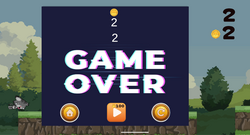
This project started with a simple question: what would it take to build a real Unity multiplayer game using SpacetimeDB, a database that doubles as your game server? The plan was to research the tool, work through the official Unity tutorial (Blackholio, an agar.io-style clone), and then use everything learned there to build something original from scratch.
The Starting Point
The appeal of SpacetimeDB was architectural: no separate game server, no separate database, no manual networking layer. Tables are your persisted world state. Reducers — transactional, identity-authenticated functions — are the only doors into changing that state, whether triggered by a player action or by the clock itself via scheduled tables. Once that mental model clicked from the Blackholio tutorial, the natural next step was to design a game around it from the ground up.
Concept: BoardBlast
The idea: a 1v1 real-time court game. Two players face off with paddles at opposite ends of a rectangular court. A ball starts in the center and moves toward one end or the other. Each player slides their board horizontally to keep the ball from passing their own end. Let it through, and the opponent scores. First to 3 points wins the match.
The game went through a few rounds of rule clarification before landing on its final shape:
- Early version — a fixed 3-round structure with round-based speed scaling.
- Revised — rounds became rallies: winning a rally scores a point, first to 3 points wins the match, no fixed round count.
- Final ball-speed rule — every rally starts at the same base speed, then accelerates continuously the longer the rally goes on, creating a natural tension curve within each point rather than an artificial round-to-round difficulty ramp.
The game was originally sketched in 2D, then converted to a full 3D environment partway through — which meant redesigning the coordinate system (X/Z court plane instead of X/Y), replacing the tutorial's DbVector2 with a custom DbVector3 type (SpacetimeDB has no built-in vector types — both are just structs you define yourself with [SpacetimeDB.Type]), and rethinking camera framing for a 3D arena instead of a flat top-down view.
Core Architecture
The server module ended up organized around a few key table groups:
- Identity & progression —
Player, DivisionRuleRow, PaddleType, OwnedPaddle, EquippedPaddle
- Matchmaking —
MatchmakingQueue
- Live match state —
CourtConfig, Match, Board, Ball
- Timing —
GameTickTimer, RoundCountdown, CountdownTickTimer, PreMatchTimer
- "Flash" events —
PaddleHitEvent, RoundWinEvent, single-row-per-match tables overwritten every time something visually notable happens, purely so the client has something to react to
That last category turned out to be one of the more elegant patterns in the whole build. Rather than inventing a separate networking channel for "hey, play a particle effect here," a paddle hit or a round-winning shot simply overwrites a tiny table row with a position. The client subscribes, reacts to the insert, and picks a random particle prefab to play at that exact server-authoritative position — no extra protocol needed, just the same subscribe/react model used for everything else.
The Match Lifecycle
A match moves through distinct phases, each with its own scheduled reducer driving it forward:
- Matchmaking —
JoinQueue scans for another queued player in the same division (divisions are strictly separated — no matching outside your tier). Instant matching, no polling delay, since the check happens the moment someone joins.
- PreMatch — once paired, a 4-second window shows both players' profiles side by side (avatar, username, rank points) before anything moves. This phase was added specifically to give the "VS screen" moment its own beat, and required extending
MatchState with a distinct PreMatch value.
- Round countdown — a 3-second on-screen countdown plays before the ball spawns, both at match start and after every point scored. A particle effect plays before this countdown too, but only when a round was actually won, distinguished client-side by checking whether the match's score is still 0-0.
- GameTick — the actual physics loop, running at 20 ticks/second via a scheduled reducer: ball movement, wall bounces, paddle collision with angle-based deflection, and boundary crossing detection for scoring.
- Match end — win, loss, ranking point adjustments, coin rewards, promotion/demotion checks, and full cleanup of every timer and transient row tied to that match.
Ranking: The Five-Division System
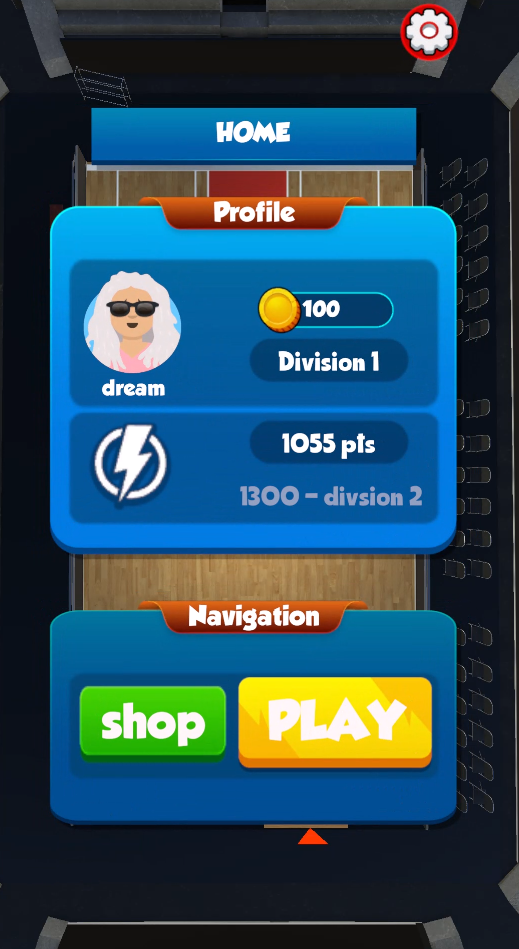
Progression was designed as five divisions, each with its own win/loss point ranges and its own promotion threshold — explicitly modeled as data (DivisionRuleRow) rather than hardcoded branching logic, so balance changes are a SQL update, not a redeploy:
| Division | Promotes at | Win points | Loss points |
|---|
| 1 | 1300 | 30–35 | 10–15 |
| 2 | 1500 | 30–35 | 10–15 |
| 3 | 1700 | 20 | 10–15 |
| 4 | 2000 | 15 | 10–15 |
| 5 | — (top tier) | 10 | 10–15 |
Demotion was added symmetrically later — falling back below the exact score that promoted you into your current division drops you back one tier, with division 1 acting as a floor.
A disconnect mid-match doesn't let you dodge the consequence either: the server detects an active match tied to the disconnecting player's identity and awards the win to whoever remained, running through the exact same ranking/coin logic as a natural match conclusion.
The Economy: Coins and Paddles
Winning matches pays out coins, spendable in a paddle shop offering boards of increasing length — a small progression loop layered on top of the ranking system. Paddle length isn't just cosmetic: it's read server-side at match creation and directly affects the actual collision boundary in GameTick, so a purchased upgrade has real gameplay weight, not just a visual difference.
Identity: Avatars and the VS Screen
Every new player is randomly assigned one of ten avatars at registration. That single avatar_id integer flows everywhere identity needs to show up — the in-match scoreboard, the pre-match VS screen, the player's own profile panel — all resolved client-side through one shared lookup utility mapping the number to the correct image asset.
Making It Feel Good: Particles, Shake, and Motion
Once the core loop worked, the focus shifted to feedback and feel:
- Random hit particles — a pool of different "impact" text effects, one chosen at random and spawned at the exact server-reported collision point every time the ball connects with a paddle.
- Random win particles — a separate pool of fire effects, triggered at the losing end of the court, positioned using the ball's exact crossing point at the moment of scoring.
- Camera shake — a lightweight, ease-out positional shake layered onto both of the events above, subtle on a paddle hit, stronger on a round win.
- UI motion — the countdown panel and match-over banner both animate in and out with DOTween scale tweens (
OutBack/InBack easing) rather than snapping instantly, giving key moments a bit of weight.
Input: Rethinking Control for Mobile
Keyboard input (Input.GetAxis("Horizontal")) worked fine for early testing but didn't fit the eventual target of a touch-first game. It was replaced with a spring-back UI Slider — drag to move, release and it snaps back to center, functioning like a one-axis joystick. PaddleController reads the slider's current value on the same throttled send-tick it always used, so the underlying networking pattern didn't need to change at all — only where the input number came from.
The Debugging Trail
A project like this accumulates a specific kind of debugging history, and a few of these were genuinely instructive:
- Publishing from the wrong folder — an early and very common mistake: running
spacetime publish from inside the Unity project itself picked up Unity's own generated .csproj files instead of the actual server module, causing a cryptic CLI panic. The fix was structural: the server module needs to live in a completely separate folder from the Unity project, never nested inside Assets/.
- Stale client bindings — several rounds of "reducer doesn't exist" errors traced back to editing the server module without re-running
spacetime generate afterward. Publishing and generating are two separate steps, and skipping the second one silently leaves Unity working against an outdated schema.
- The
player_id vs identity update bug — Player.player_id is [Unique], not [PrimaryKey]; only the primary key column supports .Update(). A few reducers called .player_id.Update(...) out of habit, which doesn't compile — a good reminder that Unique and PrimaryKey aren't interchangeable even though both support lookups.
- The blank-username collision — the single most subtle bug in the whole project.
Player.username was originally marked [Unique], and every newly connected, not-yet-registered player got inserted with username = "". Since a unique constraint applies globally, only the first ever unregistered connection could hold that value — every subsequent fresh identity got flatly rejected at the connection layer with "value already exists," even though nothing was actually wrong with their registration. The fix was removing the database-level constraint entirely and relying on the manual uniqueness check already present inside the RegisterPlayer reducer, which only needs to apply to genuinely chosen usernames, not the shared placeholder default.
- Silent reducer failures — a recurring lesson: calling a reducer from the C# client SDK is fire-and-forget. A
try/catch around the call site catches connection-level failures, but never a server-side rejection (insufficient coins, duplicate username, and so on). The correct pattern is subscribing to that reducer's specific event callback and checking ctx.Event.Status for Committed versus Failed. Several UI scripts were quietly assuming success and updating regardless of what the server actually did, until this was corrected.
- Court scale mismatches — the gameplay bounds (
CourtConfig.court_width/court_length) and the actual visual arena asset drifted out of sync more than once: walls repositioning to the wrong spot, paddles ending up off the real playing surface, a custom floor mesh getting incorrectly rescaled based on a "default 10-unit plane" assumption that didn't apply to a bespoke asset. The fix each time came back to the same principle — treat the server's court dimensions as the single source of truth for both rendering and physics, and measure the actual asset's real-world bounds rather than guessing.
Reflections
- Data-driven rules beat hardcoded branches. The division system, court dimensions, and paddle catalog all live in tables specifically so they can be tuned with a SQL statement instead of a redeploy.
- Every visual moment worth reacting to can be a table row. Particles and camera shake didn't need a custom event system — they needed one small, frequently-overwritten table each.
- Fire-and-forget reducer calls demand explicit result handling. Assuming success is the single easiest mistake to make when moving from a traditional request/response API mindset into SpacetimeDB's model.
- Match the server's gameplay math to the client's actual geometry, always. Any hardcoded assumption about scale, on either side, is a bug waiting to surface the moment the art doesn't match the placeholder.
BoardBlast is still growing — the paddle shop, division ladder, and presentation layer are all in place, with room ahead for deeper progression systems and a real cross-device login bridge once the core game loop is fully proven out.
More from the build